Available application
ViFo – Price Quotes
Calculate quotes from your own price list and design kitchens or furniture from modules. Both run in your browser, no installation.
ViFo – Price Quotes is designed for the Czech and Slovak market: the interface is in Czech, amounts are in CZK and VAT follows Czech rules.
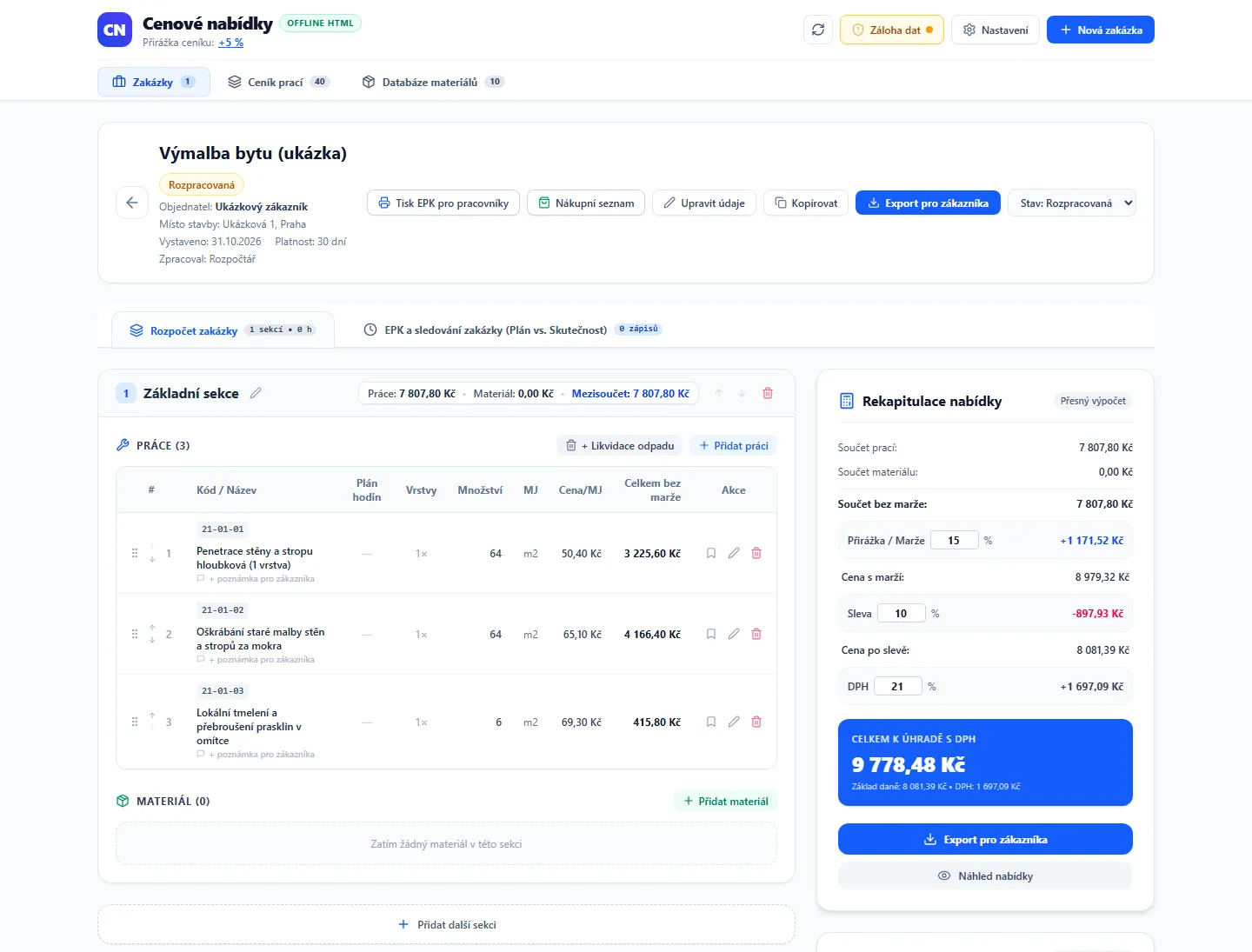
App interface shown in Czech. The app is currently available in Czech only.
Features
What the application offers
Clear job sections
Jobs organized into sections (e.g. Kitchen, Bathroom) with subtotals. Duplicate jobs with one click and track status: draft, sent, approved, done, archived.
Calculate from your own price list
Work with your own price list. Linked materials calculate by area, with layer multipliers, transport fees, and customer-supplied material options.
Margin, discount, and VAT to the cent
Margin, discount, and VAT calculated down to the cent. All calculations covered by automated tests.
Customer export
Export quotes to Excel (.xlsx) or print/save as PDF. Customers never see margin, purchase costs, or internal material codes.
Material purchases
Track material purchases: planned vs. actual, discounts, suppliers, and purchase history.
Labor price list & materials database
Custom labor price list and materials database. Import and export from CSV and Excel, price change history.
Company details via Company ID
Fill in customer business details by Company ID via Czech business register (ARES). Optional and requires internet.
Offline and local backups
Runs offline in Chrome and Edge; data remains in the browser on your computer. Download backups to a JSON file.
Sample price list & guide
Includes sample price list and guide. Import your own price list easily.
Customer export
What the customer quote looks like
Download the quote as Excel (.xlsx), or print and save as PDF. Includes items by section, subtotals, discount, VAT, and total price.
- Customer never sees profit margin.
- Customer never sees purchase costs.
- Customer never sees internal material codes.
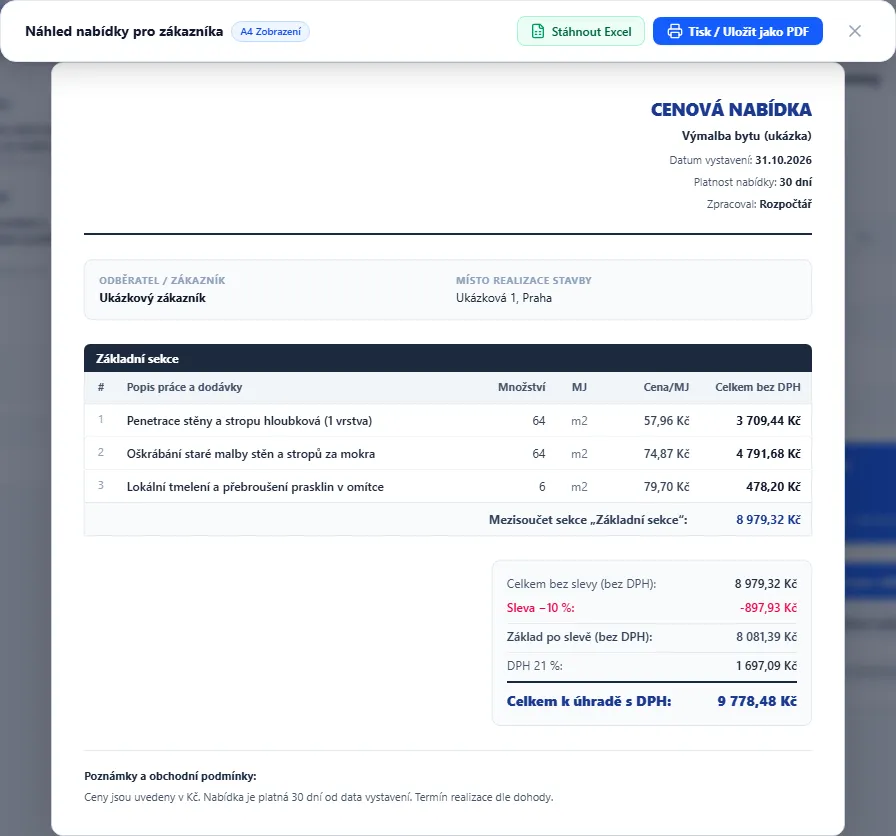
App interface shown in Czech. The app is currently available in Czech only.
Who it is for
- Tradespeople and small craft businesses (painters, tilers, electricians, plumbers, and more).
- Anyone who currently prepares quotes in spreadsheets or on paper and wants price lists and calculations in one place.
- Anyone who needs clean quotes for customers while strictly monitoring margins and material costs.
System requirements
- Computer with Google Chrome or Microsoft Edge browser.
- No installation: application is a single HTML file opened directly in your browser.
- No internet connection required. Only optional business lookup via ARES requires internet.
- For PDF export, use standard browser printing (Save as PDF).
Price list & data
Your price list, your local data
Import labor price lists and material databases from CSV or Excel. The application tracks price change history.
Important notice about data
Data is stored in your browser and tied to the file location. We recommend keeping a single copy in a fixed location and downloading regular backups.
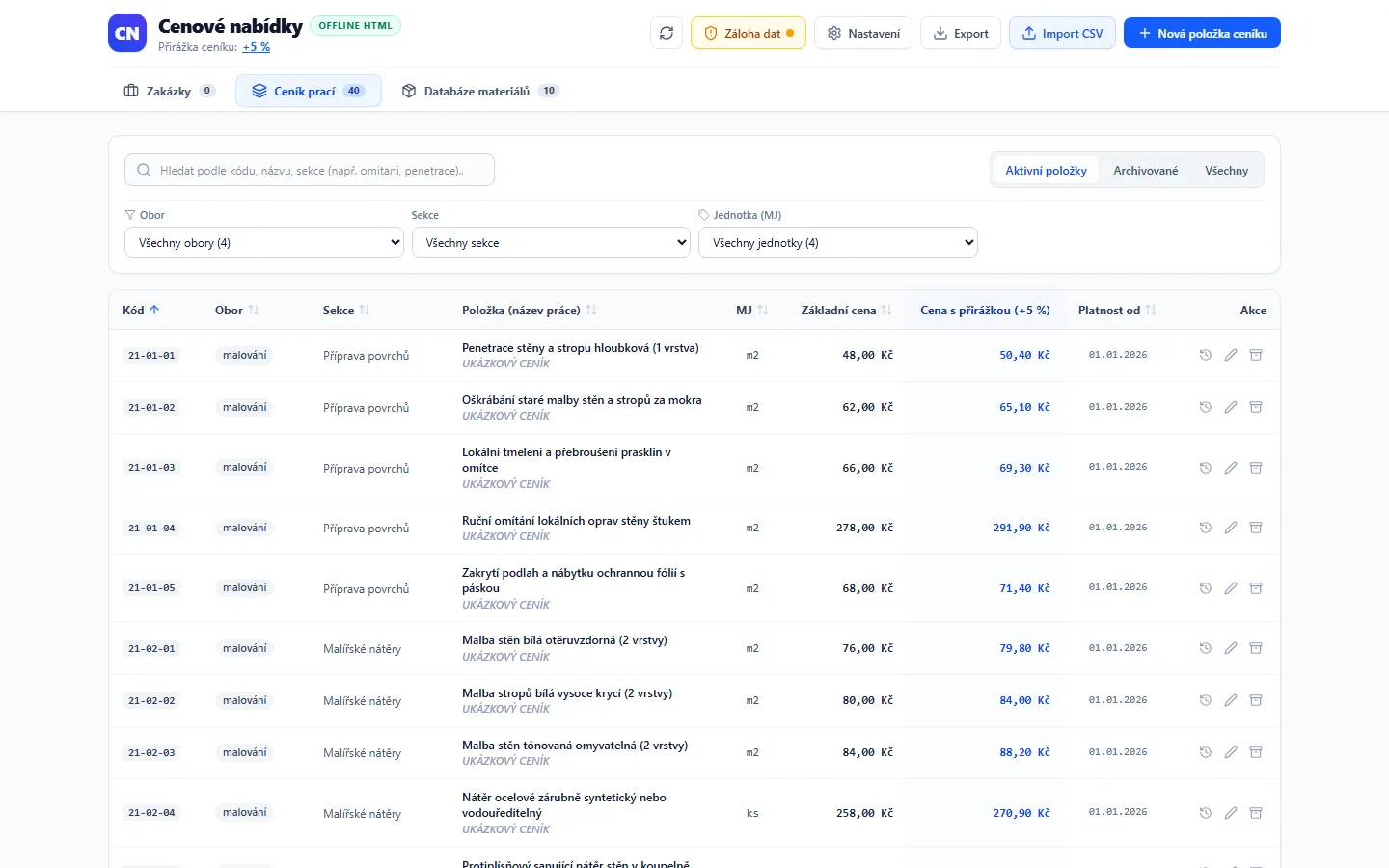
App interface shown in Czech. The app is currently available in Czech only.
Try the demo
Full application with sample data directly in your browser. Nothing is sent to any server.
Frequently asked questions about the app
Do I need an internet connection?
The ViFo – Price Quotes application does not require internet. It is a single file opened in your browser and used completely offline.
Internet is only needed for optional company details lookup by Company ID via Czech ARES registry.
Where is my data stored and what happens if I clear browser history?
Data (jobs, price lists, materials, settings) is stored locally in your browser on your computer. Nothing is transmitted anywhere.
Data is stored in your browser and tied to the file location. We recommend keeping a single copy in a fixed location and downloading regular backups.
If you clear browser storage, move, rename, or open the file in another browser, the app opens without data. You can restore data anytime from a backup (JSON file) created via the "Data Backup" button.
Does it work on Mac and in other browsers?
We recommend Google Chrome or Microsoft Edge (Chromium-based). Automated tests run in Chromium; other browsers have not been tested.
Can I use the application on multiple computers?
[TO DO: licensing rule]
How will I receive updates?
Updates will be downloadable in the customer account zone. Data transfers easily via backup file.
[TO DO: update conditions]
Can I import my own price list?
Yes. You can import your own labor and materials price list from a CSV or Excel file. The included sample price list can be cleared before importing.
Find more answers on our Frequently Asked Questions.